
Do you dread tax season and the thought of how to organize tax documents for the entire year?
Have you fumbled through fancy (and expensive) electronic systems that just don’t seem to work for you?
Do you wonder how in the world you’ll find all the papers and documents and receipts you need?
Are you the person who files your taxes on April 15 every year because you put it off until the very last minute?
Would you like to change that all this year… and in future years?
If you answered “yes” to any of the above questions, you’re in luck! Dave and I use one of the SIMPLEST, easiest, fastest, cheapest methods to organize all our tax documents each year … and I’m sharing it with you today!
At this point in our lives, we don’t feel confident doing our own taxes.
Instead, I compile everything needed for our family’s personal taxes and my business taxes (I file as an S-Corp) and hand it over to our accountant to do the “heavy lifting”.
However, I still need to find and organize ALL the paperwork for the whole year. Thanks to the simple system below, I can do this all in roughly 10 minutes (tops!)
This post contains affiliate links. Read my disclosure here.
How to Organize Tax Documents in Minutes
STEP 1 = Create.
At the beginning of each new year, I designate a single manila file folder for that year’s taxes.
I just created my “2020 tax folder” a couple of weeks ago, so it’s ready to go for NEXT tax season.
NOTE: I create one folder for our personal taxes and another one for my business taxes.
STEP 2 = File.
Over the course of the next 12 months, I immediately file EVERY document I will eventually need for next year’s taxes into that manila folder.
If I get something electronically, I print it off and put it in the folder right away.
STEP 3 = Evaluate.
Come tax season, I quickly look through our folder to make sure I have all the documents I need. I follow the checklist from our accountant so I know I’m not missing anything!
Then, I bring the folder to our accountant and wait for our refund!
I’ve been using this ultra-simple method to organize our personal tax documents for years and years. So far, I haven’t spent more than a few minutes getting all our tax documents organized for our accountant.
And I rarely ever need to go back and find something I forgot or misplaced.
Give this simple system a try next year… I guarantee you’ll thank yourself when it only takes 10 minutes to organize your tax documents!
The Tools We Use to Organize Our Paperwork:
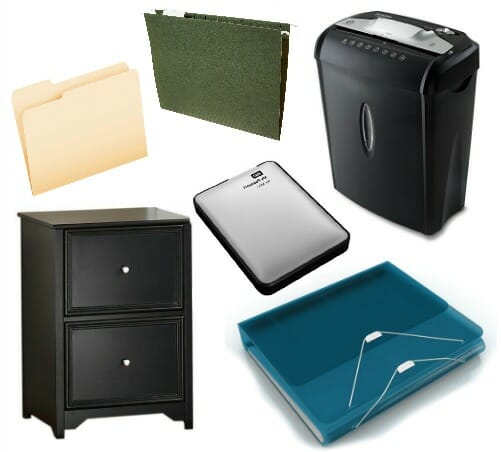
In general, we don’t use many tools to help us organize our paper… but here are a few that have been helpful over the years.
- Small filing cabinet (we found ours for $10 on Craigslist and I gave it a little makeover!)
- Manilla file folders (I always get the left-tab folders, not the triple-tabbed, because it’s easier to find what I need when all the labels are on one side)
- Hanging file folders (make sure to buy the correct size for your filing cabinet — letter size or legal size)
- Portable hard drive (ours is specifically for Mac computers, but you can easily find similar styles for whatever computer you have)
- Duo Binder (for our important paperwork, for manuals, for craft projects, etc. We have at least 4 of these floating around our house!)
- Small paper shredder (I honestly don’t shred a ton, but it is nice to have one available)
Related Reading:
- How We Organize ALL our Paperwork
- The Importance of an Important Information Binder (and how to create your own)
- How We (majorly) Pared Down Our Paper Clutter
- Our Tax Refund Baby Announcement from 2017 🙂
I know there are situations when a simple system like ours might not work… but for the majority of families with “normal” tax documents and information, this system is a dream.
Give it a try… you might be surprised how much time and stress you’ll save!

Tara says
Andrea! I just have to comment on this again as it is a repost from awhile back and I can see my initial comment from 2012 where I sound very frustrated and don’t believe I could ever follow through with this type of system. Just reading your posts about taking small, basic steps towards simple organization has helped rewire my brain over the years. Reading this today I realized I actually use this system and, although I still kind of dread pulling out my tax folder and totaling up categories before we take things to our CPA, I no longer have to hunt for tax paperwork. In fact I no longer have to hunt for any of our paperwork. I have a paperwork system that I put into place soon after you first posted this in 2012 that alleviates so much stress. I can be across the country visiting a friend and my husband might text me wondering where a certain document or receipt is and I can point him to my files and he finds it easily every time. This is nothing short of miraculous and he is always so impressed at my skills. Thank you for truly changing lives with your content, attitude and approach. I can say you have absolutely changed my life, home and family for the better. So thankful for you plugging away so faithfully at this all these years. It feels like you’ve I vested directly into my life. When I share your posts with my husband (which I’ve done often over the years) I just call you my friend in Michigan, because you’ve blessed my life like a friend would.
Andrea says
Thank you SO much Tara — I’m smiling from ear to ear right now!
I’m thrilled your life has improved so much — and humbled to have played even a small part in those positive changes.
Tara says
It’s fun to see your updated reposts for me. I have commented so much over the years, it’s been fun to see what I said to you nearly ten years ago and where I am now. It’s plain to see you’ve influenced many things in my home and how I think about tasks and organization in general. We are planning home remodels and I still refer to your posts about all your home projects to help me really think about how to make a space mine and work for my workflow. All these years and I’m still here benefiting from this blog!
Jennifer says
This is perfect, with a little discipline. One helpful thing I do is accept payments from my clients via a PayPal business account. I can view/print monthly/yearly reports with all payments recorded and fees (2.8%). If I take a class or purchase something online for my business I pay from that account, so that is recorded, too. Sometimes I’ll take checks from local clients, so I have a business savings account connected to my personal bank account…another way to keep it separate and easy, with nothing to file.
Melissa says
Same system here. My husband likes to start estimating our refund every year before Christmas, so it’s nice to have it all handy for him. Even though we all know official papers don’t come until end of January – he can’t help but get started 🙂 I intend to go paperless over the next year, but I’ll always do this for taxes.
Davina says
I have used the exact same system and it works great! I never have to hunt for my documents. They only thing I do different is I use a red (or any colored folder) so it’s easy to see in the drawer.
Lorrie says
I do too, except my folder is green — for money! 🙂 It works beautifully!
Andrea says
green for money — love it LOL!
michelle says
What about all your business receipts, mileage etc? Home office deduction stuff, utility bills etc? Are they all in their or do you have another business file?
Andrea says
I have a separate folder for my business taxes — but I also do a lot of that online at http://www.outright.com
Patty Gardner says
My system is similar except that I write details on the front of the file. I have spaces for personal property taxes, health insurance (we’re self-employed), real estate tax, etc. As those papers come in, I write the amount on the front of the file and place the supporting document in the file. Then when I do our taxes (using Turbo Tax), everything is on the front of the file. And I can see at a glance what information is missing.
Tara says
This is such a surprisingly easy system! The unfortunate thing (for me, anyway) is that no system works unless I actually work it, and I always fall short. I guess if I put the file somewhere easily accessible it might be easier to do, but I still forget to put stuff into the folder. Gah!
jackie says
I have been paperless since 2009, Quicken allows you to attach copies of any payment, so I attach them as I enter the entry in the register, shred and recycle the paper….no paper to to store or file!
At the end of the year I put any end of year statements in the file for the accountant and if they need a copy of anything I just print it off and send it over. Love not having the big file to hold on for 7-10 years! Whooo Hooo!
Lyn says
In addition to bank statements, giving receipts and W-2s, you need real estate tax bills, medical and Rx receipts, 1099s from investments, receipts from donations of goods at Goodwill and receipts from donations of new items (back-to-school supplies in August, angel tree items in November and December, etc.).
I also use an envelope to keep track of it all.
Anna says
I do the same thing, except I use a large envelope. It’s a huge help to just take a minute during the year and immediately file what I need and have it all right there when I get ready to do my taxes.
Heart and Haven says
I also use a manilla folder for the year, ie. “2012 Taxes”.
Also, for my rental properties – I created an Access database where I keep track of all our expenses (ie. maint., repairs, utilities, etc.). I have a box that I keep next to our file cabinet to place the receipts, then enter them into the database from time to time, and file the receipts as back-up in case of an audit. With the Access database, I can easily print out a report (listed by property and year) of all the expenses with totals at the bottom to make it easy for my accountant.
I also keep an Excel spreadsheet (adding a new worksheet for each year) where I track things like medical costs, childcare costs, donations, car registrations, mortgage interest & property taxes.
– The reports I print out for my accountant saves me money by having the totals in a convenient format for him, rather than paying him by the hour to add up all my receipts that can be used for tax deductions.
jerilyn says
I do this but usually start my folder in January for the last year. I seem to only need W-2s, bank and church giving statements. Um, what should I be putting in all year?
Pixie508 says
If I make a donation and get a letter, that goes in there. We’re members of our local zoo and historical society, both are tax deductible, the letters about that go in the file. If I donate clothes/household goods, I keep the receipt from the organization, and a list of everything donated.
When my kids were younger, I kept the receipts from daycare/preschool, as again, that’s tax deductible. Then in Jan as documents arrive, I put those in. I also have an email file too – that’s where I put any electronic communications with tax implications (primarily monetary donations). I prepare my own taxes, so I don’t need hard copies.
Then I have a folder on my hard drive for any tax forms that I need to download/get emailed to me that I want to save (like a W2 or from our HSA) and I save it there. I also save our tax returns there once we file them.
Heather Ratliff says
That’s exactly what I do! When I file our taxes, a printed copy goes in one file folder with the TurboTax CD and I keep the CD for the same number of years I keep other back up documents (7, I think). I keep all my backup documents in a plastic shoebox and store it in the top of a closet. Then I clean out the documents each year and use that now-empty box for this year’s documents.
skye @ neathering our fest says
we have two envelopes – one for my husband (who is a pastor) and one for my business! it seems to work pretty well for us! 🙂 but i agree that immediate filing is the best way to do it. no matter what you keep it in – as soon as you get that receipt or document, stick it in the folder! that way there is no chance to lose it! 🙂
Kristia {Family Balance Sheet} says
I do something very similar and I have a post ready for tomorrow about the topic. We have our tax meeting this week….tis the season.
Firesparx says
I have almost the same technique except my file folder is labelled “Current Year Tax Docs”. That way I don’t have to make a new folder every year. When we get our taxes back I file them into a two-pocket folder (hubby’s taxes on one side, mine on the other).