
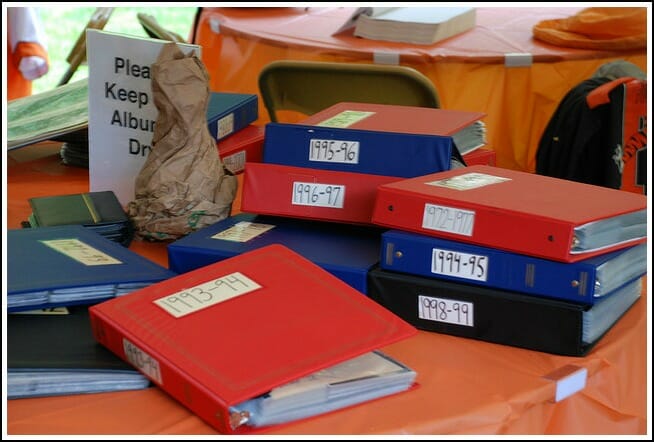
One area of my life that I’ve had to work REALLY hard to get organized is our photos.
It was especially difficult when we first got married because Dave’s parents had a bunch of his pictures, my parents had a bunch of my pictures, some of our pictures were digital, some were in albums, and some were just in boxes {either at our house or our parents’ houses}. Some photos were in order, others were just a compilation of dates and events…
…and there were SOOOOO many of them!
I felt like I’m sure many of my clients feel when they think about tackling a big organizing project — I simply had no idea where to start or how to start!
Who can relate?
All our pictures and picture albums sat in boxes for the first 2 years of our marriage until I finally decided to bite the bullet and just get started.
My Photo Organizing Process:
Since Dave’s parents were still living in the state of Washington back then and we didn’t have nearly all of his pictures, I decided to start by organizing all of my pictures.
STEP #1: Get ALL photos together… in one spot.
This was somewhat of a challenge, but I ended up finding them all and laid them out in our extra bedroom. It was a bit overwhelming to look at SO many pictures, but I had to get them all together before I could get started.
STEP #2: Purge.
I did my best to put all the photos in chronological order — and during that process, I purged any:
- doubles
- triples
- blurry photos
- bad photos
- photos I didn’t like
- photos I didn’t want to keep
- photos where I had no idea who/what was in them
- etc. etc.
I was pleasantly surprised by how many photos I eliminated, and suddenly my project seemed SO much more manageable!
STEP #3: Scan photos into computer.
We were getting close to spring break, so I recruited Dave to scan ALL of my pictures from birth through high school {I got a digital camera in college} onto our portable hard drive… and he lovingly agreed. It actually didn’t take him that long, I promise 🙂
Meanwhile, I continued to organize all my digital photos from the beginning of college, through our dating years, our engagement, our wedding, and our first couple years of marriage. I followed the same steps above by deleting any of the pictures I didn’t want anymore.
STEP #4: Create digital folders.
Since we had so many pictures to work with, I simply created one folder for each year of my life {1985, 1986, 1987 etc.} And then put the photos from that year into the appropriate folders.
I know several people who break it down even further by month, but since some of these photos were 25 years old, I knew it would not be possible for me to break them down by month. However, now that I’m all up-to-date, I DO break down the photos by month — and I will continue to break them down by month from now on.
STEP #5: Create and print photo albums.
I use Blurb digital photo books to create digital scrapbooks with all our pictures. The program is totally free to download and you don’t need to be connected to the Internet to use it. There are tons of programs out there that are very similar to Blurb, so feel free to choose your favorite one, I was just really impressed with the quality of books Blurb creates and I have no reason to look for another program.
I’m totally finished with all my pictures and working to finish up all of Dave’s pictures {I want to get this ALL finished before the baby comes!!} Once I’m done, we will only have four 1/2″-thick albums instead of boxes and boxes of pictures! .
- Andrea: birth-8th grade
- Andrea: high school and college
- Dave: birth- college
- Dave and Andrea: 2004 – 2010
STEP #6: Maintenance.
Once I get caught up on all our pictures from the past {which I’m hoping to accomplish in the next week or so} then I want to get in the habit of creating one digital scrapbook for every year — starting with 2011.
So, all year long, I’ll take, edit, and file my pictures digitally on our portable hard drive, and then at the end of the year I’ll sit down and create one “scrapbook” for the year.
The nice thing with Blurb is that those albums will be saved and available via their website forever so I can always go back and print extra copies of our books — or reprint our books if something were to happen to them.
STEP #7: Protect our photos.
Photos are something you can never replace, so it’s a good idea to have them backed up and protected in some way.
Right now, we simply store ALL of our photos on a portable hard drive that we always keep in our fire-proof safe. I also have a copy of our photos on a USB drive just in case something happened to the hard drive.
My goal is to eventually get all of our photos uploaded and organized on Flickr — but I haven’t gotten there yet!
STEP #8: Print our favorites.
I have an issue with printing photos — because I hardly EVER do it!
I take pictures, I organize the pictures, I store the pictures, I put the pictures into digital scrapbooks — I just never actually print any of them out to put in frames! It’s crazy, but I guess I figure that if I have them store digitally, then why waste the money to print them.
However, I know once we have our baby, we will want to print pictures — so I’ve committed to getting better at this! Plus, it’s just so easy to print photos online and have them mailed right to you… I really have no excuse!
So that is my system for organizing photos. It definitely isn’t perfect and it definitely isn’t the only way to do it… but it works for us {at least for now!}.
I finally feel like I have our photo situation under control and with just a few weeks left before the baby comes, I can now get excited about taking more pictures because I have a system to help me quickly and easily manage the photos I take.
What about you? How do you organize your photos?
I’d love to hear any other suggestions, ideas, tips, etc. for how you organize and manage your mass amounts of photos. Do you have any photography resources you’d like to share?

Peter says
Andria,
Great post. And a lot of good questions. I am in the process of publishing an ebook on this very topic. With a bit more detail. Specifically on the electronic preservation suggestions.
Stay tuned.
Regards,
Peter
Tina says
I have started organizing photos and I am still at the gathering step. One thing I have run across is tons of negatives. I would like to buy a DIY negative/film scanner so that I can scan my negatives and take it with my when I visit relatives to scan their photos. Does anyone have suggestions for a film/negative that they are happy with? Reviews on these products are all over the place but I’d love to organize those long forgotten negatives and hopefully run across old photos of dearly departed loved ones.
Andrea says
I personally don’t know of anything tina, but I’ve posted your question on my facebook wall. There’s a good chance someone else WILL have a suggestion (you can read any answers here)
Will says
I’m in the process of doing something similar, except I have my photos backed up to three places. Laptop, external hard disk backup, online backup (carbonite) and ipad.
I also discarded photos to Start as I had so many and it was so overwhelming, but I regret doing this now. I found when creating albums, my memory would suddenly switch back and narratives would form… some crappy pictures were of very funny moments, or represented key pieces / events on the trip. U fortunately by the time I realises this, many of these pics were in the local tip or deleted from my computer. If I could start again, I would organise the pictures roughly and just start albuming / yearbooking… and discarding those that dont fit into the narrative.
The ipad is a great device for creating yearbooks and photoalbums. Great quality display, easy to pass around friends to view etc… can be made into a digital picture frame to hang.
Kathryn says
Greetings! It’s January 2013 and one of my goals is to scan all of our pictures. I have a couple of questions about the scanning. We have an HP printer that scans as you mentioned that you have as well.
1. Do you file the picture as a .jpg or something else?
2. When you save the picture how do you add information about who is in the picture, where you are, etc. . Does that information print if you decide to print the picture?
3. What software do you use to print your pictures and what type of paper do you use to print?
I thoroughly enjoy your blog and look forward to your postings each day. I hope I’ve not opened a can of worms with these questions. I appreciate your guidance with this and any other little bits of information you might have.
Andrea says
Thanks Kathryn,
Well, to answer your questions:
1. yes, they are all .jpg.
2. we don’t add any information about the pictures — we actually don’t even name them. We just save them by year, and then by month. If we need a picture, we just search for that year/month and then scroll to the picture we want.
3. We don’t print any of the pictures. We scanned them in so we could get rid of the printed copy, so we have no need to re-print them again. However I suppose if we did ever want to print pictures, we would do it through Shutterfly, RiteAid or some other print shop.
Chris says
Hi Andrea and everybody else!!! I love pictures because they tell our life story. I’m always trying to learn the best and most economical way to preserve. Many years ago (this is telling my age) we glued or taped the pictures in books and now I’m having to redo because the tape and glue is rapidly eating through the pictures (this was before acid free was the ‘thing to do’). A lot of my pictures are fading away also.I recently took a class and it was recommended that you keep 3 copies of each picture – such as 1) scrapbook or book, 2)disc or such off computer and 3)store at a reputable site for free such as where you print your books. Never use home printers to print your pictures because the ink is laid on the paper and it won’t last. I almost feel silly passing on this info because personally I don’t have this knowledge, this is what was passed on in the class. Bad experiences with pictures have made me cautious, not overly, just cautious with how I treat my pictures this time. And always try to take a picture of your child before their first birthday. My first picture is around 3-4 yrs old and I would love to see what I looked like back then. Just a few suggestions.
Rebecca says
Can you print from Blurb without paying?
Edith Northam says
Why are you going to upload (further?) onto Flickr?
I’m 70 and have pics of “my” famly from infancy plus I have 4 sons. So my project will
probably take the rest of my life!!!
But, I’m encouraged by your info and the other comments!
Thanks for a great site! I made your Simple-Quick-Cheap pasta sauce last night.
Just the ingredients you listed. It was great and I will continue to use it.
I also read the Beer Bread recipe and will be making that in the next couple of weeks.
I have made the same recipe before – but used beer. However, beer is expensive now and
I won’t make a loaf of bread that cost $2+ when I can get it less expensively at the store.
Maybe not quite as good tasting but – I AM 70 and on a fixed income. The carbonated
beverages are – still – reasonably price – for this and for my budget. I can’t imagine that
the bread will taste as good but I’m going to give it a try – probably with Coke. It’s a little
more full-bodied than Sprite (my other inclination) and perhaps will give the bread the
taste I want.
Long post. But, thanks so much for having a site that is teaching this “old dog”, new tricks!
edith
Andrea says
Thanks Edith,
The only reason I’m thinking of uploading my images on Flickr too is because there is the possibility of my external hard drive crashing… and even though it’s not super likely, I would then lose all my pictures!
So glad you’re trying {and liking} many of my recipes… and I think you’ll be surprised how good the beer bread tastes without beer!
Amber says
Your photo system sounds similar to ours except I havent started on the older pictures that are not digital. I have always used SmugMug to upload all the pictures. I know it cost money but I feel better paying a little so that maybe they will be there years from now.
Pyper says
I have tons of photos with negatives. What did you do with the negatives? I have maybe 1/4 of our photos scanned in. My son did it last summer, but he didn’t get very far because we have so many!
Laurel says
Hi Andrea,
Your photo system sounds great. I have the same questions that J.C. has but also want to know if you tossed out the older prints that you ended up scanning to your computer. I am a lot older than you and have TONS of photos that are not digital. I would love to clear out, but am a little afraid of tossing out my pictures even if I have them saved on the computer. What do you recommend?
Andrea says
Thanks Laurel, yes, we simply used our own digital printer/scanner and the photos turned out great.
And yes, I did toss almost all the photos after I scanned them in, organized them, and printed our albums. We gave our baby pictures back to our parents [because they wanted them] and then our older pictures {middle school – now} we simply kept one very small shoe box of our favorites and tossed the rest.
it was kind of a weird feeling… but we are loving all the extra space we have and if we ever need a printed picture for anything, we just head to our hard drive!
J.C. says
I have boxes & boxes of photos from my childhood (pre-digital camera era), as well as several that my parents gave me from before I was born (not to mention my husband’s photos!). I’d love to scan the “keepers” & get rid of the prints, but I worry about the quality of at-home scanning with my all-in-one printer. Do you recommend a particular brand/model scanner or a legit company to send them to for scanning? I’ve heard horror stories about so many scanning companies, but it seems so time-consuming to scan them one by one myself, let alone having to buy a dedicated photo scanner for good quality scans. Any suggestions?
Andrea says
JC, I actually just used our newer HP all-in-one digital printer/scanner and it worked just fine. the picture quality is great and we’ve printed photo books and single prints with no problem. I’m not sure about any scanning companies to recommend, but you would definitely want to make sure you trust them before handing over all your pictures!
It honestly didn’t take us that long to scan everything in — just a few days of spring break and we were finished. You might be surprised how quickly it goes!
Megan Camp says
You organize your photos almost exactly how I do. I am SO thankful that I uploaded all my photos to Shutterfly because I accidentally deleted 2004-2007 photos off my external hard drive. I would have lost everything from the time I got married until the birth of my daughter. SO GLAD they’re still accessible online.
I make a photobook for our family every year. I have plans to do ones for my husband and I from our childhood but haven’t pulled it all together yet. Someday it’ll happen though.
Way to go getting all caught up!! That’s hard to do!
Heather Ratliff says
I also file mine on the computer using folders for year and month. Like you, I also rarely print any out! As for keeping them safe, they are backed up on my external hard drive continually (using Genie TimeLine) and to SugarSync. I never have to think about backing them up, but they are backed up twice that way!
Rita @ the busy minimalist says
Hi Andrea! Your photo organizing system is SO similar to mine! I’m in the process of scanning my older pictures and I also make blurb books! I used to have a big box full of pictures, but not anymore! Most of them are now organized chronologically in my computer. So much easier!
Have a lovely weekend!