
Do you have Too Many Passwords??
Over that past few months, I’ve been asked numerous times if I could create a simple way to track and organize all the passwords, usernames, account numbers, and other information that is SO easy to forget.
Well, since “simple” is my specialty — I quickly whipped one up!
Actually, I already had a really cool spreadsheet that Dave and I have been using for the past several years. It helps us to organize all our many passwords…and believe me, it has saved out butts more times than I can count!
Since we do everything online, our life tends to run on usernames and passwords. So we keep a digital copy of this Excel Workbook on both our computers, and printed copies in our filing cabinet and in our fire-proof safe. This way, if anything ever happened to us, our relatives could access our bazillion different accounts without much trouble at all.
Let me show you around…
So when you download this free document {links are at the bottom because I actually want you to read this} you’ll see four different tabs — or worksheets.
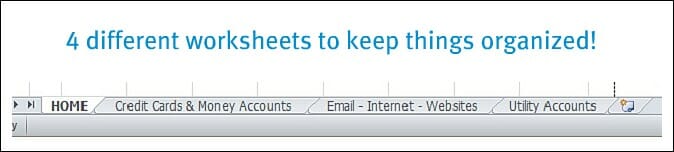
The HOME tab simply explains more about this document, how to use it, and the copyright laws.
Credit Cards & Money Accounts Tab:
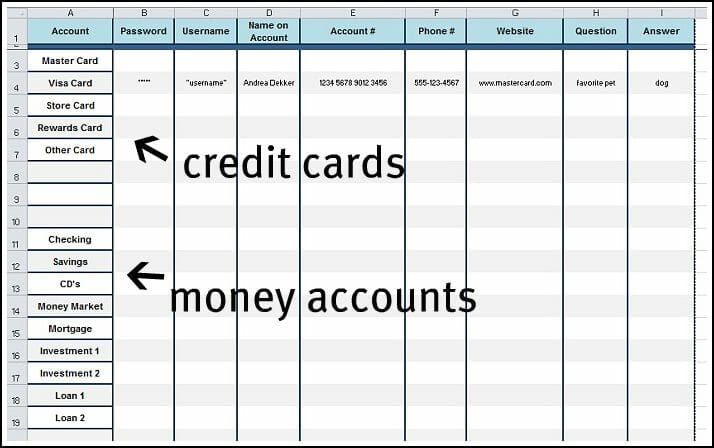
This tab provides a place for you to list ALL your different credit cards, bank accounts, and other money accounts.
I made enough space for your password and user name; PLUS extra space for all the other important information like the name on the account, the account number, company phone number and website, your secret questions and the answers — because all of that information is necessary at times.
Email, Internet, & Website Tab:
The second worksheet gives you a spot to store important log-in information for email accounts, craigslist, E-bay, PayPal, facebook, twitter, and any websites or blogs you have.
I also left a few blank spaces for you to add your own internet passwords.

Utilities Tab:
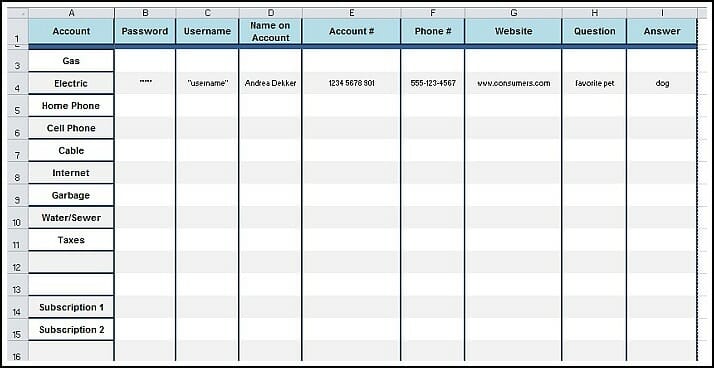
Dave and I pay ALL our bills online, so you better believe we have usernames, passwords, secret questions, pin numbers and more for every single account. But I keep it all organized on this Utilities Worksheet!
OK, so that’s my Password Workbook!
It works great for us, and hopefully it will work for you and all your passwords as well.
Obviously, this is not something you should carry around in your purse or computer case — it would be REALLY bad if you lost it!
However, keep it in your desk drawer, save it in a secure folder on your computer, put a copy in your filing cabinet, etc. so you always know where to find it when you need it.
Download this Free Workbook!
If you would like to simply PRINT the workbook and use it “as is” — click here.
If you would like to PRINT a BLANK version of the workbook — click here.
If you would like to DOWNLOAD the EXCEL.xlsx workbook to EDIT on your own computer — click here.
(If you have an older version of EXCEL you can download the .xls workbook here.)

Celia says
Andrea,
Thank you for your spreadsheets! I have a very basic one, but I like how you categorized everything and it is editable, too! This will prove very helpful!
ogremom
Andrea says
you’re welcome!
Sparkz says
I think what you’ve done is interesting, but not very safe. I would never store passwords in an open excel spreadsheet, you’re just asking for trouble from hackers.
I have been using a program called Oubliette from Tranglos software for years. You don’t have to install it, I just unzip the program and all of its files, and put it in a folder on a USB drive. I update the password file every time I add a new account, using the days date. So I have lots of these data files saved on the USB, so even if I lose the external drive, no one can access the files, since they are encrypted with my passphrase.
Like I said, the program has worked for me for at least 10 years. The guy that developed it no longer maintains it, but it is open source, so no secrets. His website no longer exists, but it is still available from sourceforge. Here’s the website: https://sourceforge.net/projects/oubliette/
I like it because it is NOT an online program like dashlane or some of the other programs, and costs nothing to use forever. Also, I like to keep my data files local, because I definitely don’t want someone accessing my bank accounts. Just my two cents, but you can decide if a spreadsheet is better for your purposes, but for me, I will have to say NO.
Lastly, if you want someone to be able to access these accounts if you’re no longer around, just leave them the password labeled on the USB drive, I’m sure someone smart enough will be able to figure out to run the exe file and input the password. It’s not rocket science, but it’s definitely a lot safer than a spreadsheet. And you can also print out all the accounts and passwords from the program if you decide to.
I like this program because it has worked for me for many years. I don’t know the author, and I don’t receive anything for saying what I’m saying. It’s open source, so even the author is not making any money from it. But what I will say is that he has done a great job, and you can’t go wrong if you decide to use this program. It will even work in Linux using the WINE program.
Alberta says
Hi,
I just downloaded your Excel password keeper and when I open it, it is completely blank. Just an introductory letter. Please advise.. I would love to edit it and use it. was there a ‘time” limit on downloading this?
Thanks for your help!
Alberta
Andrea says
there are multiple tabs at the bottom of the page — those are individual worksheets within the workbook. Click on those tabs and you’ll see the rest of the information!
Sheri says
Just wanted to thank you for the password spreadsheet. It’s exactly what I was looking for! Thank you, thank you!
Laurie says
Absolutely perfect, just what I was looking for!
GEORGE says
Thank you.Very helpful.
Candace Lee says
I can’t get this to open on my computer! Is there another way for me to get this?
Margherita Sewell says
Hi Andrea,
Just want to say I have used your password workbook always.
Thank you for allowing me to use it> I just love it! And thanks for creating it.
Andrea says
yay — so glad it has been helpful for you!
margo mcdonald says
This is exactly what I wanted. I am so glad I came across it. I wanted to put all the accounts, passwords, and keep in a safe, in case something happened to me. For my family to be able to locate the info. When my brother passed away, we had a hard time to find out about his accounts, payments, etc,
mende says
thank you for the worksheet
julie says
andrea,
when i download either of the excel files, all that i get is a blank excel file?
thanks for this. hope fully i can get it to work
Andrea says
Hi Julie,
I just quickly went back and tried all those links and they all worked for me. Keep in mind that it will look very “blank” because you will need to fill it in with your own information. Feel free to email me if you still can’t get it working.
Pam Shultz says
You are an answer to prayer ! Where have you been all my life?
Thank you and keep up the good work!
Michele says
Hello I have downloaded your editable worksheet but the only thing I see is your logo and information page, no other tabs etc. Am I doing something wrong? I really like the idea of how you organized your worksheet and hope I can get it tailored to work for my stuff. Thank you .
Andrea says
Hey Michele,
I’m honestly not sure what to tell you. It downloads just fine for me — so maybe it’s a setting on your computer or something. Sorry I can’t be of more help on this one 🙁
Olwen says
Hello, Sounds like a wonderful help, but when I download the excel work book it is empty, just as if I opened excel on my own computere. It does have your logo. Any ideas?
Olwen
Paulo Jorge says
Many thanks for this file. It is the one i was looking for.
Regards from Portugal.
Lori says
Hi Andrea,
I was ‘googling’ trying to find a simple, yet exhaustive template for the numerous passwords and types of accounts that hubby and I have! You nailed it! Thanks so much for helping me to add some simplicity to my everyday work!
All the best,
Lori
Andrea says
glad to help!
Dinubhai says
Andrea,
I am thrilled to use your Excel spread sheet. I was looking for one for a long time and it is simple to use for a lay man, 75 yrs old! God Bless You.
arjunhunurkar says
Thats really useful, tbh i’m already organised with it but i’m looking for more extra layer of secuity in excel. like a password on a cell, the whole password column shoud be protected with a password!! is this possible??
pls reply
Monique says
Thank you for being there!
Karen says
Very good thanks
Jeanne D says
The worksheet does not download. Neither one of the downloads works for me. Can u double check this please?
Andrea says
Hey Jeanne, I just tried all the links and they opened up right away for me — so at this point, I’m guessing it’s something with the device you’re trying to open it with. Sorry!
Calvin says
Thanks for sharing this. I was about to spend a few hours creating one and it would not have been as stellar as this one. I have Chronicle for the Mac and it is great but I like to see everything on one page to ensure I didn’t skip something. Thanks again and have a Happy New Year!
Diana says
Thank you!!! This is just what I needed. You are truly blessed.
Andre says
Hello, Andrea.
You have wonderful blog, a lot of nice ideas, You made my life much simpler.
But with password organizing in my day-to-day surfing (my work is tied with it hardly) I can’t live without LastPass (google it), because i have maybe 100+ passwords on various sites, and on some sites I have more then one account. It is free, simple, works seamless and is must-have for someone with that amount of passwords to use.
acne scars says
Its like you read my mind! You seem to know so much about this,
like you wrote the book in it or something.
I think that you could do with a few pics to drive the message home a bit,
but other than that, this is great blog. A great read.
I will certainly be back.
Beth Delaney says
Thanks so much!!
Shanna Nowosielski says
Hi Andrea! I’m filling in my password worksheets and I need more rows! I am terrible with Excel. How would I add rows to the bottom of the worksheet and keep your formatting? Thanks!
Andrea says
Oh boy, this might be difficult to explain if you don’t know anything about Excel 🙂 Basically, you just need to right-click and then select “insert row” however, I’m not 100% sure the formatting will transfer over — and I don’t know how to explain that. Do you know anyone who is good with Excel?
Susan says
easiest thing to do hover your mouse over the ‘row number’ (important) of the row where you want to start to copy (the cursor will appear as a solid black arrow) and then highlight how many rows you want (make sure it’s an even number of rows, a grey and a clear to keep the formatting) – right click and select copy – then go to row on the sheet where you want the extra rows to appear – click the line number – right click and select ‘insert copied cells’. hope this helps oh, and you also need to make sure you have enabled the editing.
Carolyn Waidelich says
I love your password worksheet!
Our family needs this tremendously!
I tried to download it in order to customize on my computer, but I think that my version of excel is not advanced enough to open a .xlsx file (I have version excel 2000). Is it possible to obtain a .xls version of the file? Perhaps you could email it to me?
Thank you so much!
Shanna says
This is glorious! Thank you!
Http://Easy-Profit.Biz says
I really love your website.. Excellent colors & theme.
Did you create this website yourself? Please reply back as I’m trying to create my own blog and would love to learn where you got this from or just what the theme is named. Appreciate it!
Tina says
I seem to be having a problem downloading the spreadsheet. Any suggestions?
Karen says
Soooo thrilled to have found your sheet…VERY surprised how challenging it was to find a simple, yet thorough, list for storing passwords — especially one offered blank where i can use my own labels/names for things. Thank you sooo much! It’s perfect. I knew with enough searching i wouldnt have to “reinvent the wheel”. Thanks for sharing your work!
Andrea says
Thanks Karen,
Yes, my worksheet is VERY simple — but it works well for us and it’s nice to have everything all in one place!
Glad you’re getting good use out of it 🙂
Denise says
I’m on the verge of using LastPass for all of my passwords…what do you think?
Andrea says
Denise, most people we tell you to never use the same password for all your accounts, but as long as you’re careful, I think it’s a pretty nice way to simplify everything!!
My one suggestion would to pick a word that you can easily remember and then add a 2-digit number on the end. So for example, you might pick “Poodle10” for your password. Then, when companies force you to change your password every few months, you can just increase the number by 1 — “Poodle11” “Poodle12” etc.
Ellen says
Thanks so much for sharing this. I love it and I know it is going to be a great help.
Taletha says
Great idea. I think I have a few too many accounts with a few too many websites and it’s hard to remember each and every account name and password that my husband and I create. Maybe I can get my husband on board with this and we’ll stop having to ask each other what goes with what account.
Andrea says
I think we all have TOO many passwords! It’s overwhelming…and so frustrating when you can’t remember one.
Hope your hubby likes this helpful organizer too!
Joanna says
One thing that might make it more secure is if you don’t line up the password info and the account info exactly. That way if someone does get their hands on it, there’s an extra layer of protection for your passwords.