
Ever since I posted a picture of my organized files, I’ve been bombarded with questions asking for more information about the specific categories and sub-categories I use {yes, I have sub-categories!}.
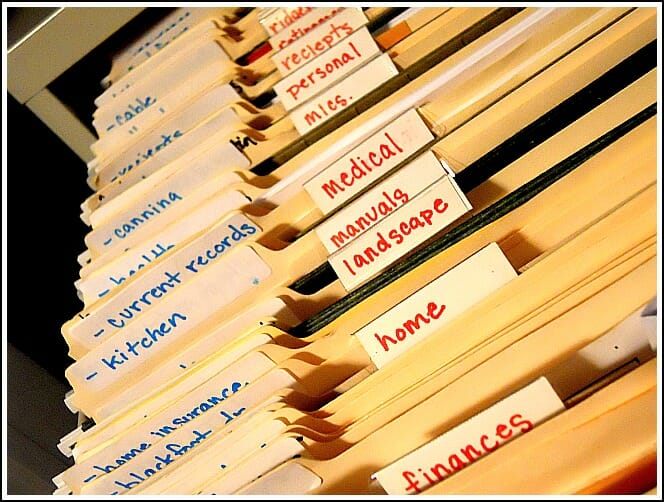
I figured I would get this questions, and I’ll be honest, the main reason I hesitate to show you OUR categories is because they are OUR categories. They work for me, for Dave, and for our needs…but they might not work for you.
For example; we file our home insurance under “home”, our vehicle insurance under “vehicles”, and our medical insurance under “medical. But you might simply have one folder labeled “Insurance” and file all your insurance information in that folder.
So before I show you OUR files…consider a few things:
1. What name will you think to look for?
Will you look for “car” or “vehicle”? Will you look for “home” or “mortgage” or “house” or “1234 Street Name”? Will you look for “medical” or “health” or “doctors”?
As you set out to create categories {and sub-categories} stop and think about what words will trigger your memory and then use those words as your main categories.
2. Get the proper tools.
Don’t worry, this is the easy part! My advice is to get a box of hanging files, a box of manila file {with the tabs all in one direction}, and a bold marker. You might also want a large recycle bin and a shredder!
3. There is MORE than one right way to do this.
There are many ways to organize a filing cabinet so you might have to play around a bit until you find the one that works best for you and your needs.
For example: I file our personal files in alphabetical order — starting with the beginning of the alphabet; but I file my business files in the order I use them — with the most frequently used files up front.
A peek into MY filing cabinet!
Be forewarned — you are about to embark on a very LONG list…but I’ve been using these categories for several years now and they really do work for us!
NOTE: {the words in caps are the main categories, the bullet points are sub-categories}
DIRECTORIES:
We have loads of directories for school, church, etc. so we keep them all in this file
.
ELECTRONICS:
We keep receipts, manuals, warranties, and any other information for our electronics in the sub-folders
- Cameras
- Computer Programs
- Laptops
- Printer
- Other Electronics
.
FINANCES:
We get all paperless statements so this is just basic information for these accounts
- CD’s
- Checking & Savings Account
- Credit Card Info
- Income — Dave’s income info. is filed here; mine is all in the next drawer down {my business drawer}
- Investments
- Savings Bonds
{we keep our retirement info separately — see “Retirement” below}
.
HOME:
- General — lots of info from buying our new home
- Insurance
- Improvements — this file is pretty full right now!
- Mortgage
.
LANDSCAPE:
- Equipment — manuals and warranties for our many yard tools and equipment
- Sprinkler System — we have underground sprinkling
- Plants — I like to keep record of things I’ve planted in the past
.
MANUALS:
We keep nearly all our manuals in these folders {besides electronics and some yard equipment}
- Kitchen — all small and large kitchen appliances and tools
- Other — anything besides, kitchen, tools, and electronics
- Tools — any other tools or equipment
.
MEDICAL:
- Andrea — my records
- Dave — Dave’s records
- Dental Insurance
- Health Insurance
- Life Insurance
.
MISCELLANEOUS:
I have so much information that I like to keep handy — so this is where most of it ends up!
- Canning
- Gift Ideas
- Holiday Info
- Travel Plans
.
PERSONAL:
We keep most of our REALLY important documents in a fire-proof save, but anything else that we just want to hang onto goes into these files {like certificates, diplomas, newspaper write-ups, etc.}
- Andrea
- Dave
- Dave & Andrea
- Family — we have copies of both our parents’ Wills
.
RECEIPTS:
- Store Receipts — if I think I’ll need to return something. Find more tips to manage your receipts here
- Rebates Sent — I keep photo copies of all the rebates I send until I get the rebate back.
- Rebates Received — you can also use this handy form to track your rebates
.
RETIREMENT:
Even though we try to go as “paperless” as possible, there is still a lot of information we need to keep for our retirement accounts
- 403b
- Pension Plan
- Roth IRA #1
- Roth IRA #2
- Other
.
TAXES:
We keep the last 7 tax refunds in our fire-proof safe, and once our 2010 taxes are done, I’ll move that file to the safe as well.
- 2010
- 2011
.
UTILITIES:
We get ALL paperless statements for these accounts, but we still need a place to keep our contracts, online account information, and contact information.
- Cable/Internet
- Garbage
- Gas/Electric
- Newspaper
- Phones
- Water/Sewer
.
VALUABLES:
I’ll admit, we don’t have many valuables — but I thought this might be useful for many of you!
- Dishes/China
- Furniture
- Jewelry
.
VEHICLES:
We keep the records of any maintenance and/or repairs here
- Vehicle #1
- Vehicle #1
- Insurance
That’s it — ALL our categories and sub-categories.
In case you can’t tell, I absolutely LOVE organizing and filing papers!
I know it’s a long list, but honestly, every piece of paper in our entire house is in that cabinet. We don’t have paper anywhere else — I can guarantee it {well, besides the newspaper}!
Even though I know some of you will be overwhelmed by the thought of organizing all your paperwork, my hope is that seeing exactly how I organize our files will motivate you to get started on your own.
And once you start, you will be amazed at how quickly you can find and access every piece of paper in your house. No more wasting time or energy searching for your lost paperwork…it will all be right there in your organized files!
Where to Start?
Find appropriate storage containers {filing cabinet, paper box, storage tub, etc}.
Toss or shred anything you don’t absolutely need {guidelines here}.
Start small — 15 or 20 minutes at a time.
How do you file YOUR papers? Do you have any secrets?

Sarah says
Hi Andrea,
I know this is super old, but I have had it bookmarked for…a couple of years. Busy, had a baby, procrastination, moved across the country… excuses, excuses! Anyway, this week I finally started by taking one file each day (2 if there’s time) and purging. I’m also making a list of the files we will need as I think of them. This post is helping me so much, along with the one with the important papers duo binder. I found a similar duo binder at Target and am setting it up as I go along.
Slowly, 15-20 minutes a day, I am going to tame this paper beast! I’m already breathing easier ;). Thank you for your detailed information on this topic.
Blessings from NM
Andrea says
This is awesome! I’m so glad you let me know! And yay for baby steps — you’ll get there eventually, and just in time for tax season 🙂 You’ll have everything ready to go!
Sarah says
I am doing a big ol happy dance! Done with this monster. Now I am working on the important papers duo binder. Your information and encouragement to JUST START, just do SOMETHING, and to quit waiting for the opportunity to do the whole project at once helped a lot.
Andrea says
wow — good for you! So happy my posts could offer some encouragement!
Jaely Velazquez says
It took me two days to finally find someone who could answer my question. I work in an office and I have a draw I created which I named Home Files (This is my Bosses Personal Files) He uses several banks and wants them categorized so the Main tab would be: BANK INFO:
1st Tab: Charter Oak
Sub Categories: Savings #0000
Sub Categories: Checking #0000
Sub Categories: Deposits #0000
Sub Categories: Withdrawals #0000
Sub Categories: Transfers #0000
Sub Categories: Monthly Statements #0000
2nd Tab: Bank of America:
Etc..
My only issue is that both his children are in college and they each have several accounts within several banks. This is driving me crazy and I seemed to have developed what some may call, “A Brain Fart”! Can you please, give me some advice?
My boss is extremely organized which is rare, in a man, but non-the-less, I would like to comply with his wishes.
Some of the subcategories are never used (which seems like a waste of manila folders to me) so should I join them together?
Laure says
I was taking a break from moving some bookcases around, and thought I’d browse some articles on filing (a favorite topic) and your article is one that I enjoyed today.
If anyone else is out there looking for file ideas, I agree completely that a file system needs to be something that suits you, but I must say that the Freedom Filer system (you buy their pre-made and blank customizable coordinating tabs) is really rather brilliant.
Whether you buy their product or simply learn enough about it and hack it yourself (I’ve done both), it can really set you up with a long-term flexible system that looks great and makes sure you have – or can quickly make – a properly labeled folder for just about any life situation that makes you want to file a piece of paper.
I resisted getting “someone else’s system” for the longest time, because I was very attached to “my” way of organizing. But not only was my thought process different from my husband’s thought process on filing, I wasn’t staying very consistent in my own thought process about filing over the years. Now we can be on the same page when it comes to filing, and I like that a lot.
The things that make the Freedom Filer system (or your hack of it) stand out is that you rarely need to make new labels unless you have an addition to your family or property or an unexpected life event (I don’t have “divorce certificate” or “adoption” in mine because I’m not planning to do those things, but you never know, right?) But I can have pre-printed things for unexpected and hoped for things for pennies, ready to use. If you DIY, do a little research on how the system works, create every possible category and subcategory, and print up your tabs in a way that gives you color – using colored paper, colored plastic tabs (hard to read through) or printing in color on the tab – filling the whole tab, filling a bar of color at the top, or printing in different colors of ink. I recently did a DIY set for my daughter because she wanted pastel colors to go with some awesome dusty pastel folders that were on deep discount, which in turn looked beautiful with her vintage grey file cabinet. I think they turned out beautifully.
The Freedom Filer system makes it easy to deal with multple users, properties, accounts, vehicles…..they provides stickers with numbers and letters on them: you assign a letter or number of combination to each generic tab that needs to be personalized and that’s all there is to it – Whether you have multiple children, multiple vehicles, multiple vehicles per person, multiple accounts etc. – you dramatically limit the number of times you need to create folder tabs! In a DIY version, you could also use number and letter stickers. You could also designate one color of folder or maybe one color of binder clip for each person in the family – the tabs will tell the frequency story, but the folder/clip color tells you at a glance whose car, account or birth certificate this belongs to.
And it doesn’t cost any more to create a few extra stickers that say car 1 or car 2 if you want, or to simply use interior folders with the name of the bank and/or last digits of the account number if multple accounts is an issue.
Freedom Filer two awesome features. First one – Their system color-codes their tabs for frequency of use.
Red is for permanent (for the life of the person or asset),
Orange is for items that are updated regularly,
Green is for financial transactions (by category or month) EXCEPT tax-related ones
Light Blue is for anything you need for filing taxes
Dark Blue for archiving records
Gray is for your your action files – if you need to hang onto a piece of paper to help you finish a job after you have added a note to your to-do list, these folders help you quickly find the piece of paper you need when you need it.. Some use a lot of folders, some use just 4, some use a 43-folder tickler system, some don’t. Examples – bills to pay, letters to answer, calls to make, coupons to use, waiting for responses/deliveries, meeting agendas, data entry, read/review, 1-31, Jan-Dec – whatever suits your life.
Example – have you ever found your car papers jumbled up? Previous and current car files, payment stubs mixed with policy updates and proof of liability and the repair receipts and vehicle registration from years past – and when you needed to find a current one, it took 10 minutes to dig through the pile to find the most recent one?
Whether you keep everything to do with your car in one place or whether you let all the colors live with their own kind, you will see quickly what goes where for the fastest retrieval:
Red – (copy of) car title if you bought it instead of leasing it, along with significant repair records, Receipt for new speaker system and the warranties that are currently active on your car.
Orange – the most recent policy, most recent proof of liability insurance, current auto club paperwork and maybe that extra little card. Loan or Lease papers.
Green – if you have any payment stub for lease or loan, they live here until they are scrapped, unless you can deduct these expenses for business.
Light Blue – if you bought the car this year, the receipt showing how much you paid in taxes. If you get to deduct any expenses for car or fuel, etc. it goes here, ready for tax time.
Dark Blue – previous year’s tax paperwork, anything you want to keep from previously owned vehicles and/or whatever you want or need to keep from the orange and green categories.
Gray – you might have a coupon to consider using in next months tickler file or a coupon file, or estimates for repairs or improvements you are considering or maybe you have quotes from competing insurance companies, brochures you are looking at while shopping for a new car.
Purple – you wanted to hold onto old brochures because you like the pictures. An article that you really liked about a particular type of car.
Never again will you struggle to find the one piece of car-related paperwork that you need. It will be easy and almost fun to clean out files when you need to, instead of stressful.
Second Cool Thing – Self-Purging. The system is set up to tell you when it is time to purge!
They do it with Odd-Even Rotation, the 10 year Revolving Archives and Partitioning. They demonstrate the first two techniques in the Freedom Filer promotional video.
Odd-Even Rotation
Most financial transactions typically goes into either the Green Financial or Light Blue Tax folders. Unless you need the original receipt for resale, to reduce gains or to be eligible for warranty (Red Tabs) statements, proof of payment, receipts – all go into your Green or Blue folders.
You make two sets of each of these categories – one labeled Odd Year and one labeled Even Year.
You will always be ready to start filing the next year’s financial and tax paperwork, because you will have plenty of time to empty the previous year’s folders before they are needed. If you file every non-tax related piece of paper in a monthly rotation, by the time you get to a full folder, you will have kept the paper for 24 months and it should be fine to shred it before starting the current month’s filing. And your tax related folders should be ready to empty for transfer to the archive as soon as you file – worst case scenario for most folks is October 15, plenty of time before anything needs to fill that odd/even set.
The 10 Year Revolving Archive –
You can actually pick either a 5 or 10 year rotation, but each archive file is identified with a numeral that matches the last digit of each year. When you are done with the taxes for the year, it goes into the file whose numeral matches the last digit of the year you were filing for. After 10 years, you can purge the supporting documention, and move the actual return to a much smaller file. If you elected to save old insurance or auto records or financial records for that long, evaluate why you kept them that long (any legal issues involved?) and whether you can ditch them now, on schedule. Regardless of whether they get shredded or go to a deeper archive, your are moving them out of your active files to keep things lean and organized.
Partition
Even your purple fun/reference files can be set up to help you keep them mean and clean. Partitioning your files periodically (every year or so) helps you clearly identify which folders you are using, and which are just taking up space. To use the Partition technique, just start a new A-Z section each year. Anytime you make a new file, it goes into the new year’s section. Anytime you dip back into an old section, you bring that folder into the current year because you are actively using it. In whatever cycle you choose, revisit your purple folders to see which are worthy or taking up space in your life. Maybe they should live somewhere else in order to get some use – would you read those articles if they were in a binder somewhere else in your home? Or has the name of the nation changed on the map you had since your were a child?
Didn’t mean to write an essay, but filing is so much more straightforward with a system, and I thought I’d share.
rachel says
Curious about these categories now that you’ve purged and gone to the two drawer system… A filing update please! 🙂
unique chocolate truffles says
Nice blog here! Additionally your site quite a bit up
very fast! What host are you the use of? Can I am getting your affiliate link for your
host? I desire my site loaded up as quickly as yours
lol
Annye says
Hi Andrea,
thank you for your input on so many things. I’ve recently chosen to downsize (from a large 2 bedroom house) to a 247 sq/ft unit that we designed. It’s perfect. Getting rid of most of the stuff was easy but the papers are the most tedious part. I am very organized and efficient but sometimes, I tend to over organize. I have found your advice really helpful and I am starting to implement it little by little. I wanted to especially thank you for sharing you absolutely lifesaving Budget workbook. Wow. It’s so easy to use. I was going to sign up with Manilla for my online bills but I’m sad to report that they are closing. Would you have another favourite to suggest?
Aniez Astried says
It’s realy inspiring, I do need this article….100 thumbs up…
melissa says
I’m not particularly organized as a rule (which is why I read here,) but when it comes to paperwork, I know where everything is. One system I implemented a few years ago is to use a 13-pocket accordian folder for my monthly stuff. All bills and statements I don’t receive online, paystubs, etc, go into the pocket of the month, and the last pocket is used for receipts and documents for tax purposes. Everything is together, for taxes or questions or whatever. It works for me.
Lonchy says
Hello Andrea,
This article has been so helpful!! I started in a new job 3 weeks ago and am trying to get my bosses organized. Maybe I can get your feedback? (since I cannot have you here to help me :’(
I work in a Real Estate Investment office and both of my bosses have their personal and business assets. Also, they have their family’s files with personal stuff such as passports, birth certificates etc.
How do you suggest I start?? I want to treat them as “clients” so I can keep them separate but have the same structure for both. HELP!!!
Lonchy
Elizabeth Darsey says
And here I thought I was the only one who was so nit-picky with such things! I even go so far as to have color-coded hanging and file folders. They’re not much more expensive than the manilla. Not to mention, for things my daughters might need access to, they know what color is theirs and which to keep their hands off of!
One thing I have learned the hard way is to be extremely careful of using an unlocked cabinet or case! It was amazing when my daughter’s social security number started being used for all sorts of things that I had no clue about! Had I been more thoughtful about security issues, it would have never happened. A rather simple lock would have prevented the entire situation!
Even if your system you use now does not have a locking mechanism, you can easily (and usually rather cheaply) add one! Even the plastic cases with the handles on top can have locks added to them! All you have to do is know how to use a drill and buy a couple of locks, and your information is safe and secure!
Good luck to everyone in their attempts to be organized!
Elizabeth
Mike says
Andrea, Thanks for sharing and explaining your filing categories. Glad to see them. Not surprisingly, I settled on a different set (listed below in case you are curious). It is strange that there really is no general agreement on something as important as categories for home organization. The system has to work for me but also for my spouse and later for my beneficiaries.
FYI my categories:
01 Emergency and metadata
02 Employment
03 Bank and Credit Card
04 Retire
05 Bills
06 Taxes
07 Risk (including insurance)
08 Personal History
09 Real Property
10 Personal Property
11 Planning
12 Projects
13 Hobbies
14 Computer
15 Job activities
16 Misc
magnoliasouth says
Excellent ideas! I am in the process of doing my mother’s, which is a nightmare. It is absolutely too confusing to find anything. The main problem with helping elders are the mountains of hospital bills, doctor bills and any other medical bill you can think of. In one year alone (this past year actually) she was in no less than 4 different hospitals (with 6 different stays) and in 2 cities.
Don’t even get me started on the multitude of doctors she has had in the past year. No less than 11 doctors, but I’m sure I’m forgetting a couple. For each visit to each doctor and hospital and lab and whatever, we get EOBs from her primary insurance and then EOBs for each of those for her secondary insurance and on and on and on.
I tell you, I’m having nightmares about this!
In an instance such as this, what would you recommend? There is no way that one file titled “Medical” will ever work. It’s just overwhelming. So far I’ve labeled each like the following, but surely there is another way?
Medical Bills – Dr. Smith
Medical Bills – Dr. Jones
Medical Bills – Regional Hospital
Medical Bills – Southern Hospital
Medical Bills – Smith Labs
Medical Bills – Not Sure (I never use the label Misc, because Not Sure is a better description, it means ‘I’ve no idea what to do with it’)
Medical EOBs – Dr. Smith
Medical EOBs – Dr. Jones
Medical EOBs – Regional Hospital
Medical EOBs – Southern Hospital
Medical EOBs – Smith Labs
Medical EOBs – Not Sure
There is no way all the EOBs and bills will fit in one folder. Sometimes too, the EOBs have two different doctors or facilities on them, that’s where the Not Sure comes in.
Do you have any suggestions? Going digital wouldn’t be much help, since she’s computer illiterate and I don’t think any of them do digital billing anyway. Any help or suggestions would be wonderful!
Lynn says
I have many medical issues and have had to take paperwork to each Dr. A real pain. I have a file on each facility as you do, keep those is a seperate file all together and a file for the most recent FINALS that the hospital or Dr. has given, since the new Dr.’s typically want only the final report. I also have the lab finals in the same group. When I get to the Dr. I have them make me a copy of the group and take one home for the next Dr. This makes it easy to take the file with me. One hospital visit was 187 pages, but the FINAL report was 4 pages. Works well for me.
Elizabeth Darsey says
I can truly empathize with the frustration of medical files! It’s difficult for the healthiest family and sanity-testing when someone is ill.
The beginning of 2012 proved that theory when my mom was diagnosed with brain cancer. That was hard enough, but to top it off, she had several other health issues, so she had a cornucopia of doctors, specialists and surgeons!
However, it helped greatly that I have a background in medical files / medical coding, and so did my mom. She was an insurance biller for years, so we both had a slight head’s up on how to best organize, at least for us.
I found that I made a folder for everyone, everyplace and every company!
I also found that when we received EOBs it would lead a person to pull out their hair! It’s bad enough that they’d have multiple dates of service, multiple providers, but then, my parents had 2 types of private health insurance plus a cancer policy through AFLAC! Oh My Goodness!
For any EOB that had multiple anythings, it was copied. Having a copier in the house made that much easier, obviously!
So this is how I had things set up:
Physician # 1:
Physician # 2:
Physician # 3:
Facility # 1:
Facility # 2:
Facility # 3:
Pharmacy # 1:
Pharmacy # 2:
Insurance # 1:
Insurance # 2:
EOBs – Insurance # 1:
EOBs – Insurance # 2:
So when I would get in an EOB from Insurance # 1 that had information regarding two providers, I had 3 copies (each with a small note on them that copies could be found in the other locations). 1 copy for Provider # 1, another for Provider # 2 and then I usually put the original in EOBs – Insurance # 1.
It may seem like a lot of work, but if you can put in a few minutes each day you receive something (even if it’s everyday), it can make things so much easier when you find an error, need to inquire about something, or like in our case, needed to submit copies of everything to another company.
For this set up, everything in this section, was all for my mom only! My dad has his own section, as well as sections for myself, my two daughters, and even my dogs!
I feel for anyone who has to go through anything similar! It really can drain you! I did this on top of being my mom’s daily primary care provider, while being a full time student, a full time mom, and the take-care person for the house! Fun… Fun… fun! (NOT!) But organization was key to getting us through this part of it!
Good luck to you!
Elizabeth
Michele says
I know this is an old post, but I wanted to respond. My grandmother had the same filing system — she had a folder for each doctor and each facility. At the end of each year, she would empty each folder and place it into a large envelope and label the outside — “Dr. Jones 2005” — and put all the envelopes in a banker’s box. I am not doctor-loyal, so I do mine by type: Orthopedist, dermatologist, EENT, neurologist, cardiologist, gastrointestinal, etc.
Family Fandango says
Thanks for taking the guess-work out of this. I spent today putting my mom’s financials in order, and appreciated that you had figured out how to make this work! It seriously is hard to find this information, I totally agree with Bon (above). I gave you a shout out on my blog 🙂 http://www.familyfandango.com/2013/03/20/organizing-the-filing-cabinet/
bon says
Holy Cow. I love you. Have any idea how hard it is to find this type of information? All my life I’ve had someone else doing this. So, when I had to do it I was like “WTF? Gimme a shoebox.”
Joelle says
You are so inspiring! After I read your Summer Organizing Projects a few weeks ago I decided to tackle my basement and start with the office. What a mess that place is. Paper comes into the house, paper goes down to the office. I thought the filing cabinet should be tackled first. I was right. There were files in there from the late ’90s. Even worse, those files followed us through 2 or maybe 3 moves. Well, after over 6 hours of sorting and shredding (broke a shredder, had to buy a new one) my filing cabinet is finally purged. I actually do feel lighter now and inspired to keep going through the rest of the basement. Planning a garage sale at the end of the summer. Thanks for all your tips!
Andrea says
Wow — way to go Joelle!! That’s awesome!
Getting that paper organized will be a HUGE time-save later on b/c now you’ll be able to find everything when you need it.
Keep up the great work 🙂
Astrid says
I’m slowly working on my filing cabinet and I’ve got another question for you….do you keep records of every oil change on your vehicles? Seems like a lot of papers- is it necessary to keep those?
Thanks!
(I finally found those folders with tabs in the same place…they’re harder to find!)
Astrid says
Just found you via TDC’s blog party. I’ve been struggling with our filing system. It’s gotten so bad that I’ve neglected to do anything with it!
I think now I’m going to scrap my “system” (if you can call it that…it doesn’t work for me!) and give yours a whirl. Do I need to keep bill stubs/receipts?
I’ve never been sure what to actually keep and what can be tossed away. What receipts do you keep?
I really need to get a fire proof safe!
The one thing I do like about my system is that I have a binder filled with all the major household appliance manuals- so if something has a problem I just run and grab that binder. (I put the manuals in plastic sleeves). That seems to work for me. It’s the OTHER manuals that seem to multiply like rabbits that I can’t seem to get under control!
Andrea says
Your binder system for manuals sounds like a great idea. And maybe you could create a file for all your other manuals {like mine}.
Check out this article if you are looking for information about how long to keep specific paper items.
Finding a system that works for YOU is key to paper organization. It might be a mix of a few different systems so just keep trying different things until you find what works best for you!
Hope this helps.
J says
Thank you so much for this post. Very timely!!! I have a box full of papers needing to be sorted and I had no idea how to start. What would you recommend for a fire-proof safe? I am in need of one.
Andrea says
For a fire-proof safe, I would recommend a smaller style to start with {they can be pricey} but make sure you can fit 8.5″ x 11″ paper inside. We got ours from Lowes, but you can get them at most office supply stores, Amazon.com, and even Target.
kim says
What all is in your safe? In mine we have: birthcertificates, marriage lic, adoption papers, passports, etc. What else is of importance enough to keep in there?
Andrea says
Kim, our safe is pretty small so we don’t have room for a lot.
Here’s what’s in our safe: marriage license, birth certificates, passports, our life insurance policy, the deed to our house, a list of all our account numbers and passwords, contact information for all our financial institutions, a portable hard drive with all our pictures on it, and a USB drive with all my business information on it.
I also keep our tax refunds from the last 7 years {just the overview, not all the other documents} in the safe.
Thea says
I love your ideas! Thanks for all the tips. I do have one question that I was wondering if you have any advice for. What do you do with legal-size paper? for example, all of our mortgage paperwork is on legal size paper. We also re-financed last year, and tried to go through the papers, but just didn’t know what to keep and what we could toss. Also, since it’s legal size, it doesn’t fit in our file cabinet (easily, without folding). We end up stashing it somewhere and then moving it all around. I’d love to be able to file it away, but just didn’t know what the best solution is. Any ideas?
Andrea says
Thanks Thea,
Yes, legal size papers always throw things off! I like to keep all our paper in the one filing drawer so I usually just fold any legal-size documents and put them in the drawer anyway. Also, I’ve noticed that many of our legal-size documents don’t have any printed text on the bottom 3 inches…so then I just cut the bottom off to make them letter size.
That’s the best information I have…hope it helps!
Autumn says
I find that with my legal sized documents, I fold them into thirds, stash them in an envelope, label the envelope (Account, date, summary, etc.) and you can either store them regularly dropped in the file or you can use a binder clip and attach them to either the back or front of the folder. That way you can easily find them if you reference them a lot.
Andrea says
Good idea Autumn. Thanks for sharing!